Custom software development for companies
T-NEX develops business applications and extends existing systems, from clickable prototypes and integrations to agreed handover and support.
Explore service
Bookings, orders and approvals need software that connects the next steps. Our examples show how T-NEX has implemented these processes across industries. Project solutions and demonstrators are identified individually.
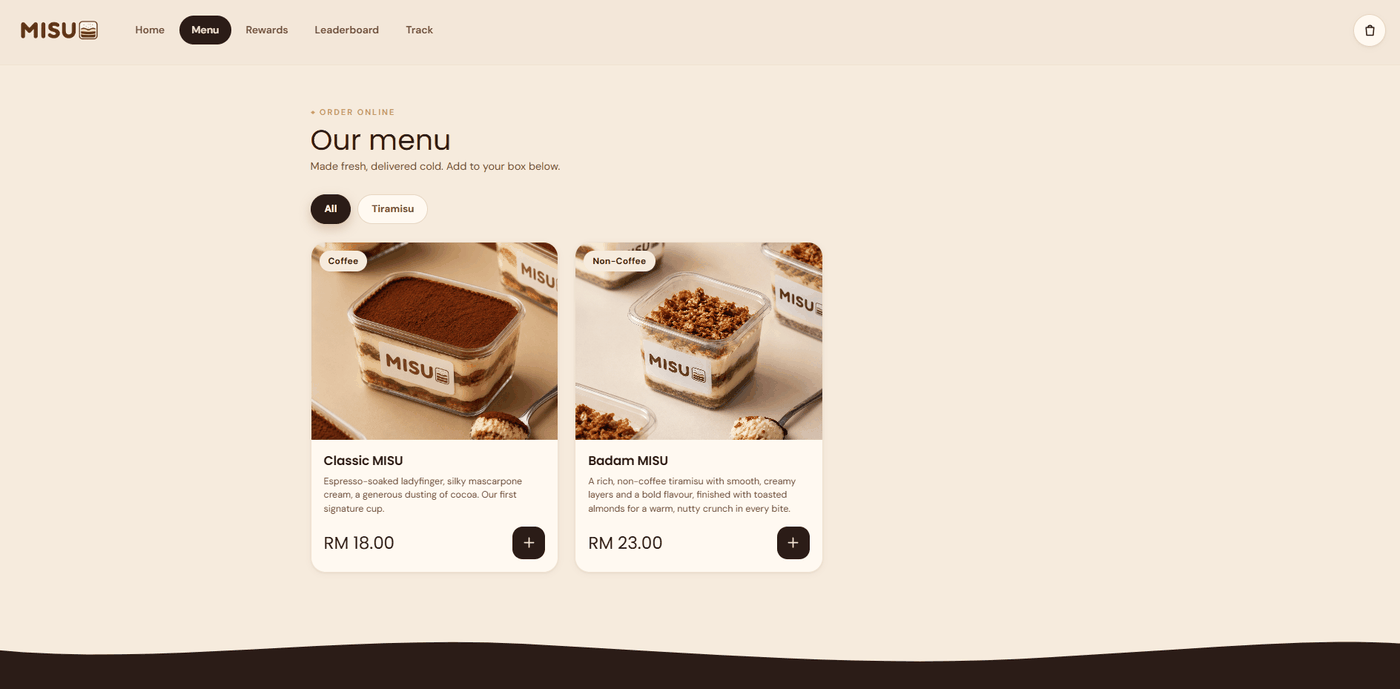
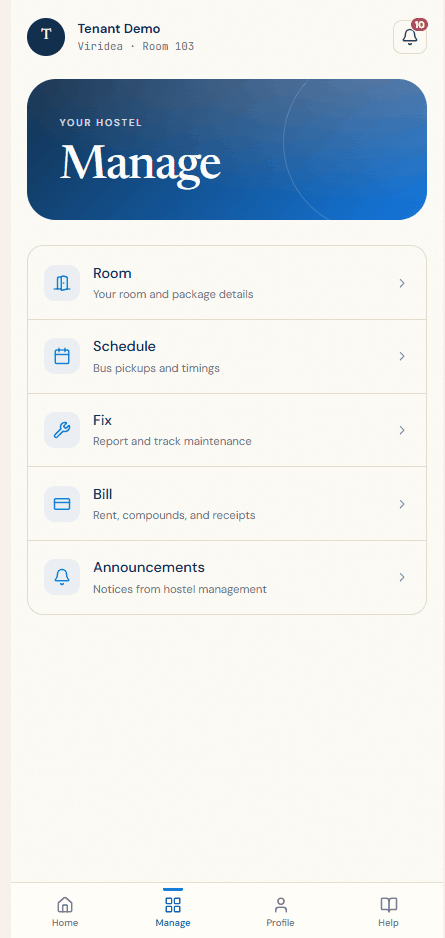
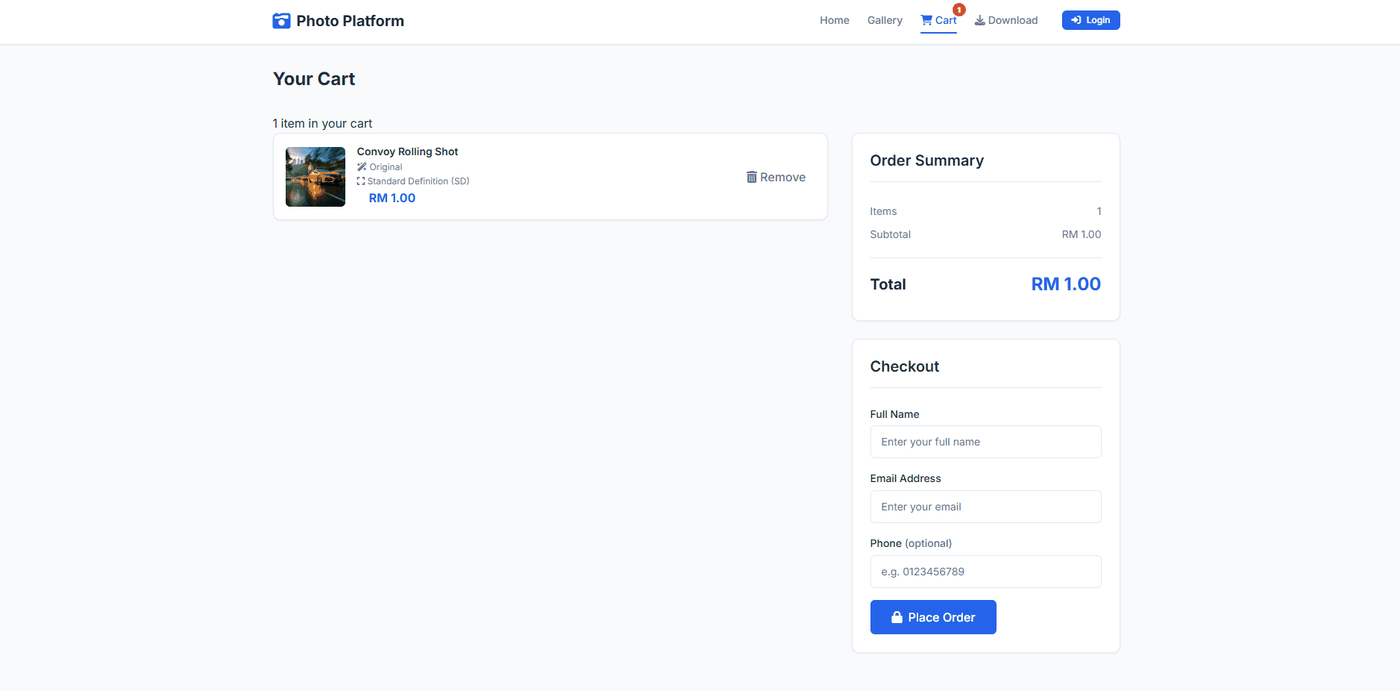
Order items, open a resident area or buy digital content: these views come from three separate implementations.
This ordering interface shows a categorised product catalogue. Items and prices lead to selection for the cart.
Add selected items to a cart
Enlarge viewThe accommodation application brings together room details, schedules, issues and billing. Residents find the information about their stay in one place.
Access to accommodation, issues and billing
 Enlarge view
In the photo platform, users choose a quality tier for digital content. The cart leads to the order; contact fields are still empty here.
Checkout for subsequent delivery
 Enlarge view
Choose a pattern around your workflow: which data belongs together, who can edit it and what does the next person need? A project example becomes a concrete starting point for your application.
In the HIJIR project, a customer record connects quotations, invoices and receipts. Travel dates, party size, room options and extras form the quotation. The invoice is derived from it; recorded instalments and the outstanding balance remain part of the same transaction.
The transferable pattern is the relationship between documents. Each processing stage carries the required information forward, while the customer record keeps its history accessible. Search, filters and an enquiry inbox support day-to-day work.
For another business, start with its document types and amendment rules: what may change after approval, who confirms a payment and how a correction becomes visible. The pattern offers a starting point for processes with several document stages.
Misu connects an order with the chosen pickup outlet, its stock and the fulfilment status. A movement ledger records stock changes. Another food-service application combines orders from several channels in one queue and routes items to the kitchen or bar.
The outlet choice therefore controls several tasks. Staff need the right order at the right location, and stock changes must relate to that outlet. The documentation describes separate views and permissions for different roles.
Additional interface demonstrations show menus, carts, order status and kitchen displays with sample data. They support discussion of the user experience. Before implementation, checks include simultaneous orders, unavailable stock, corrections and the payment connections actually required.
| Item | Implementation and adaptation |
|---|---|
| Task and contribution | Documented implementation by the delivery unit of an ordering workflow with branch assignment and stock movements. |
| Visual evidence | The attributed original view shows the ordering catalogue. |
| Interfaces | No specific external payment or ERP connection is attributed to this image. |
| Rollout and outcome | Branch structure, stock units and handover to the kitchen or collection point are planned around the business. |
The Sunnah connects prospects, customers and appointments. A booking moves through creation, confirmation, completion or cancellation. Staff and time slots belong to outlets; the application also accounts for absence and cover from another location.
Commission calculations use defined bases. Membership and referral terms are recorded with the transaction. This makes it possible to identify which terms underlie a calculation.
A similar process starts with the organisation's own capacity and remuneration rules. Questions include outlet transfers, cancellations, discounts and responsibility for corrections. A shared appointment list alone does not answer them.
An accommodation management application connects properties, rooms and individual beds with resident allocations. Check-in, check-out, occupancy history, invoices and recorded instalments are handled in related work areas.
Residents can report an issue with a photo. Staff assign the record, track its progress and work with a service-provider directory. A further area records vehicles, trips and participant allocations. Each workflow has its own roles and views.
The transferable pattern connects a managed asset to its ongoing records. A new implementation defines asset types, personal information, visibility and retention. The functions describe a project example, rather than an offered standard accommodation service for Germany.
A directory application includes a form builder with different field types and validation. New or amended information is first retained as a submission. The responsible role reviews it and applies the approved version to the directory.
The submission and the currently published record remain separate states. This helps when form fields change or an existing contributor updates only part of a record. A public submission form also directs suggestions into an internal inbox.
This pattern fits directories, application processes and master-data maintenance. Before implementation, define required information, approval rules and the treatment of rejected, corrected or deleted submissions. A new form version must not silently change earlier decisions.
A photography platform groups images by event and distinguishes drafts from published content. It generates smaller watermarked previews for browsing. Original files are stored separately; the order determines which content may be delivered.
The documented workflow connects an order, payment confirmation and a time-limited download. Revenue shares and payout requests follow a separate process. A configurable retention period determines how long files remain available.
This pattern is useful for digital goods and controlled document delivery. A specific project defines usage rights, file variants, payment methods, access rules and retention together. Repeated payment notifications, expired links and partially failed uploads belong in acceptance checks.
Demonstrations: Two designs for visitor attractions show date, time-slot and party-size selection followed by booking details. An administration view displays bookings and available capacity. The design allows daily quotas and prices to be configured.
A business can use this to discuss the path from an available slot to confirmation. The demonstration presents the interface with a prepared dataset. It provides no evidence of tickets actually sold or production handling of simultaneous bookings.
Implementation adds capacity rules, reservation duration, payment, cancellation and behaviour after a lost connection. Two requests for the last available place make a useful acceptance case.
Demonstrations: Two marketplace designs show filters, listings, watchlists and administration dialogs for records and status changes. Inputs and transitions are represented in the browser with sample data. A simulated bidding sequence explains the intended interaction.
This allows early review of the information buyers need to compare and the way administrators maintain listings. Simulated bids form part of the demonstration, rather than actual market activity.
An operational marketplace additionally needs defined rules for participation, transactions, identity and settlement. An existing proposal describes further implementation work; that proposed scope is not presented here as an already delivered marketplace.
Demonstration and defined proposal scope: An internal knowledge assistant searches maintained entries and displays a matching answer with a document and section reference. If no suitable match exists, it returns the question as unanswered. The editing interface requires a source reference for each entry.
The reviewed demonstration uses weighted keyword search. The subsequent proposal describes retrieval of stored answers and excludes newly generated language-model responses. This defines the scope more precisely than the word chatbot alone.
For a business, the first decision is whether to retrieve approved answers or generate new responses from several document passages. That choice determines the checks for source maintenance, access permissions and questions outside the knowledge collection.
Interface designs and internal work: A booking design collects departure, destination and date. Other templates connect a public company website with administration views for content, enquiries and projects. These designs demonstrate different approaches to mobile and desktop use.
Their value lies in walking through the work together: what information is missing, which list is used every day and which step must be accessible on the move? The template provides a basis for those decisions. Figures and messages displayed in a demo are sample data.
Connections to actual data and services are then agreed as a separate scope. They include server-side access controls, reliable delivery, error handling and application operations.
A pattern provides a concrete starting point. We compare its workflow with your data, responsibilities and existing systems. This establishes what fits, what needs adaptation and which functions require new development.
The origin of a function matters. A project implementation, a clickable demonstration and a proposed scope provide different foundations. Reuse of customer-specific code and the necessary rights are reviewed for the individual project.
| Decision | What needs to be established |
|---|---|
| Business scope | Trigger, inputs, processing steps, exceptions and outcome for a sample record. |
| Data and responsibility | System of record, permitted access, business approval and responsibility for corrections. |
| Integration | Available interfaces, data transfer, duplicates and handling of transmission errors. |
| Acceptance | Normal case, missing information, unauthorised access and interrupted processing. |
| Operations | Hosting, backup and recovery, support, documentation and handover. |
This page presents project implementations, demonstrations and defined proposal scopes. Specific product offers are described on the linked product pages. The required scope of an individual application is agreed separately.
A demonstration makes the interface and intended workflow visible using sample data. A project implementation describes functions of a built application. It does not establish a particular business outcome or an unchanged fit for another organisation.
No. Many patterns connect data, status changes and business approvals through fixed rules. AI can be added for free text or varying documents where its contribution can be assessed for the specific task.
Reusable components owned by T-NEX and customer-specific work are treated separately. Which parts may be used depends on the actual rights and agreed scope. A similar workflow does not itself grant permission to reuse someone else's code.
Bring a typical record and a difficult exception. We clarify the data, processing, responsibilities and intended outcome. This becomes a limited design or pilot with explicit acceptance criteria.
T-NEX develops business applications and extends existing systems, from clickable prototypes and integrations to agreed handover and support.
Explore service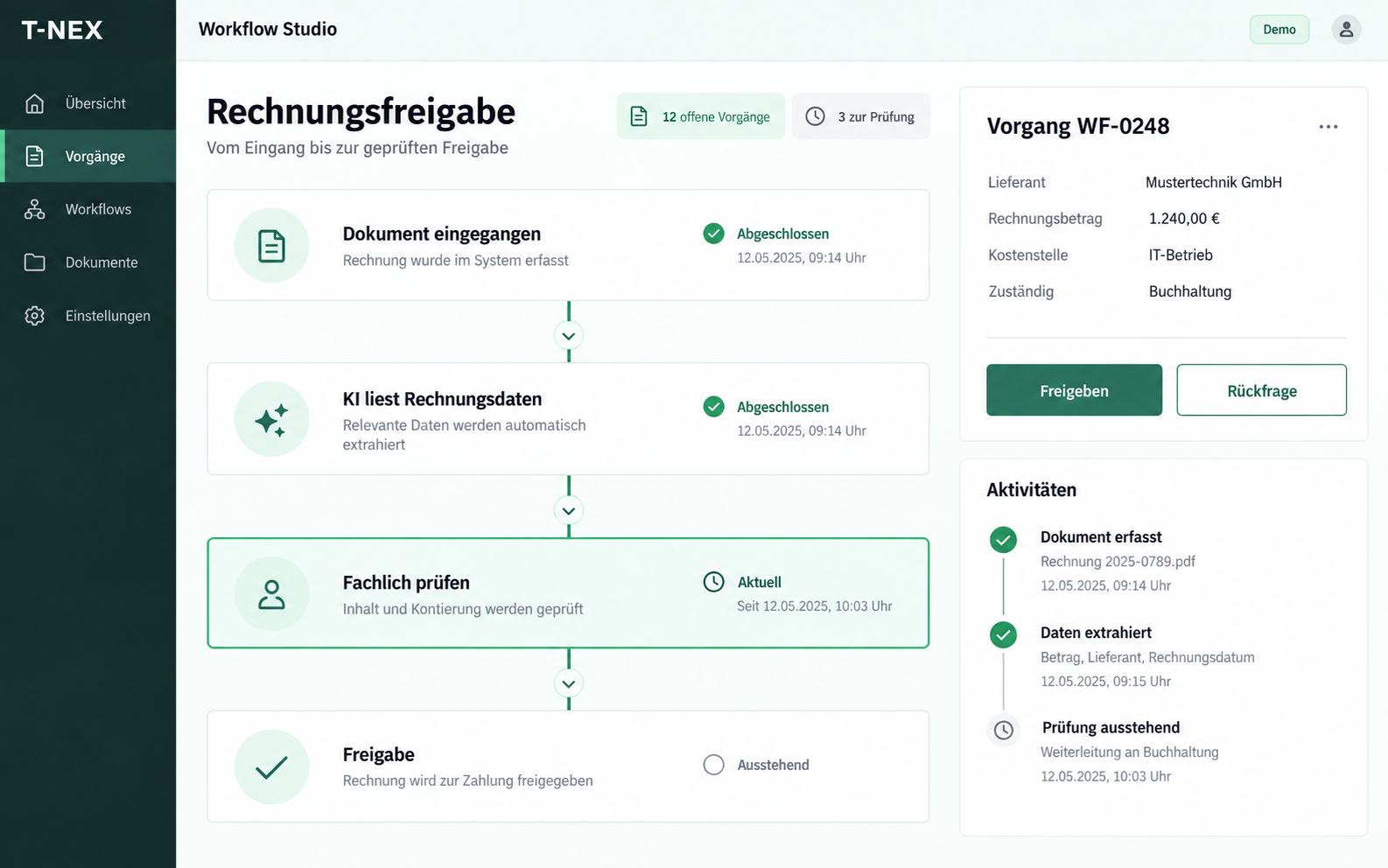
T-NEX develops custom workflows for requests and approvals, adapting existing components with suitable rules and evaluated AI steps.
Explore service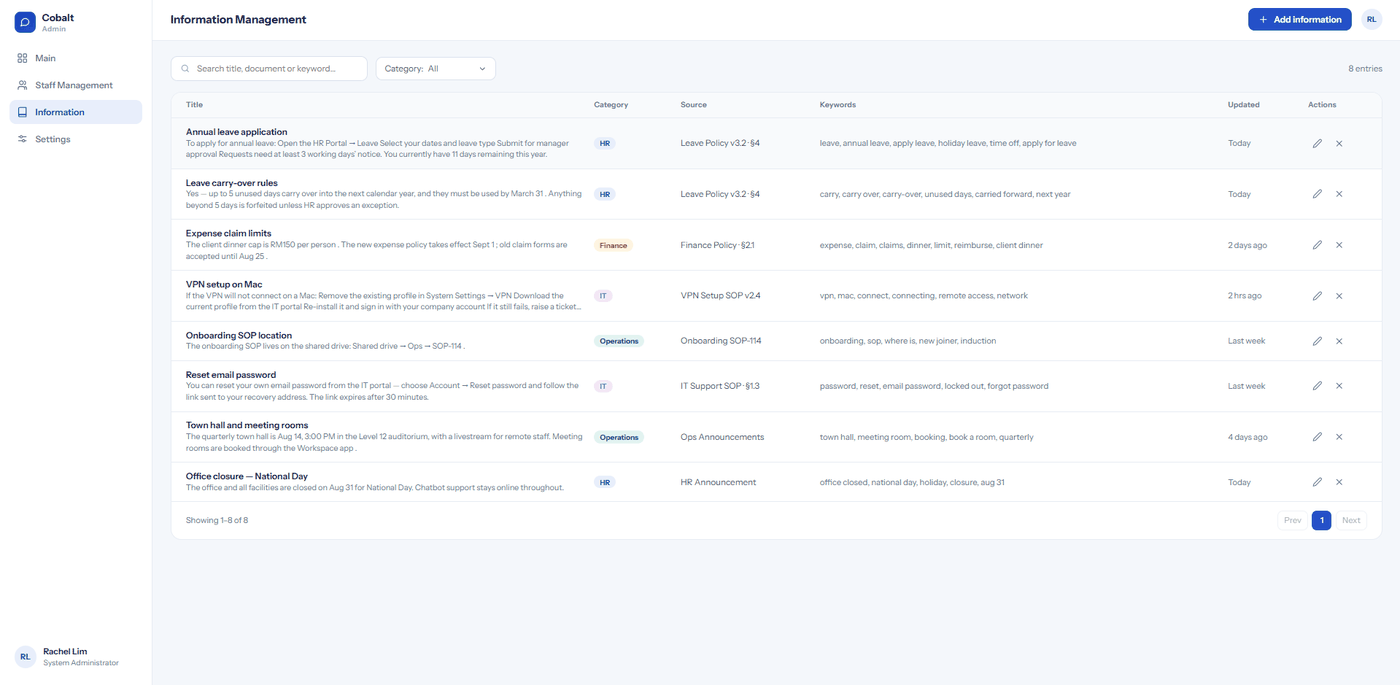
T-NEX designs and builds knowledge systems with source references, evaluating document search, RAG, knowledge graphs and maintained wikis against your questions.
Explore serviceT-NEX software projects: explore manufacturing software, mobile job recording, project planning and other applications for daily work.
Learn moreBring a concrete task. Together, we will define what the application needs to do.
Discuss your workflow