Back office for electrical inspection services
T-NEX built a back-office application for an electrical inspection provider, connecting enquiries, quotations, orders and inspection report reviews.
View reference
T-NEX connects tasks, data and approvals across spreadsheets and individual applications. Reusable platform components are tailored to your process. Your team sees what is complete and where the next step is needed.
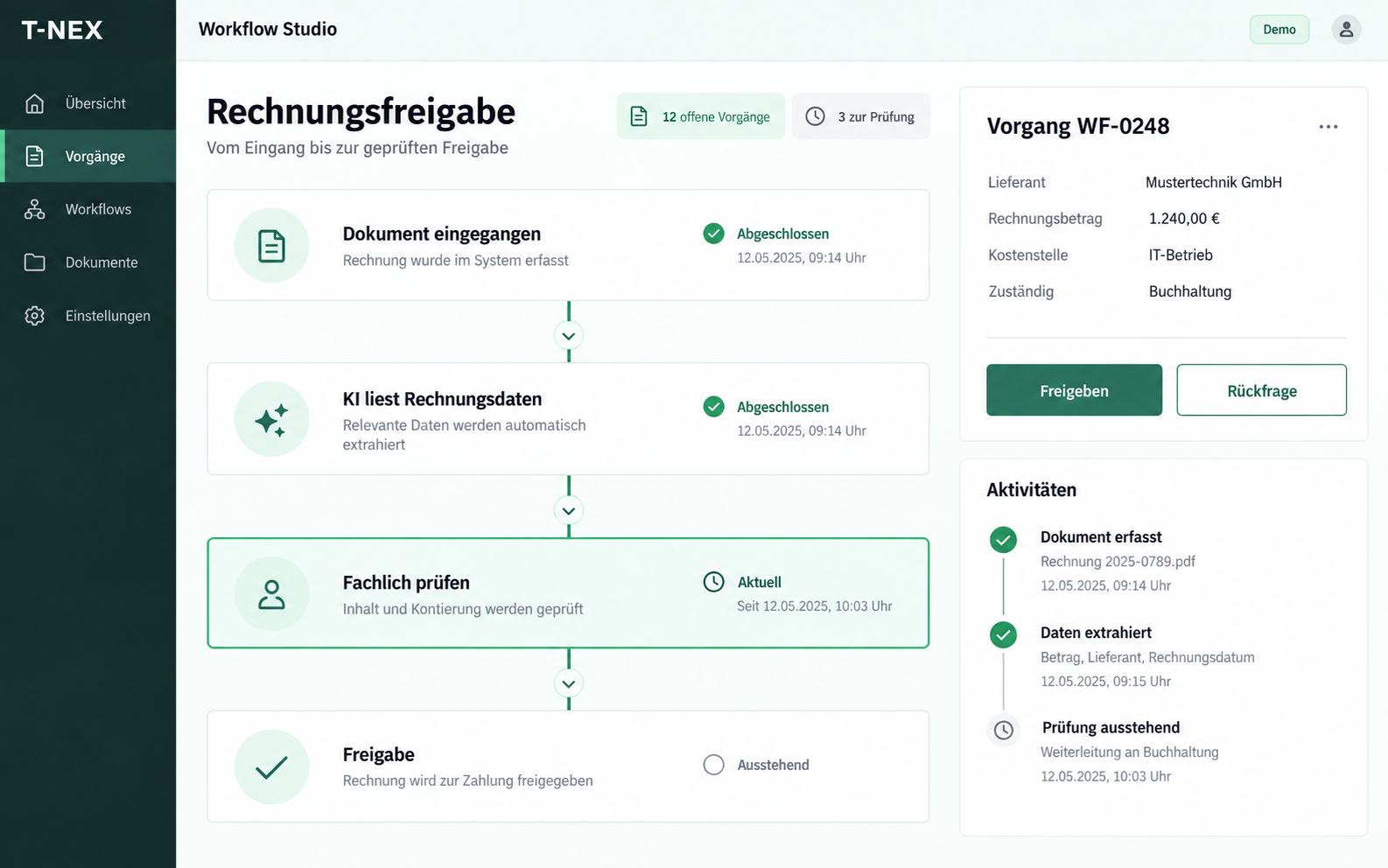
Connect data, AI and your team’s decisions in a clear workflow.
An incoming document starts processing. Data is extracted, conditions are checked and the next steps are assigned.
Automated steps and human approvals work together.
Enlarge viewThe responsible person reviews the extracted values against the source document. Unclear values remain open for review.
Your team retains control of the business decision.
| Field | Extracted value | Review |
|---|---|---|
| Supplier | Mustertechnik GmbH | Confirmed |
| Invoice total | €1,240.00 | Confirmed |
| Cost centre | Please assign | Open |
Rules and responsibilities determine the next step. A query sends the case back for review; approval triggers the agreed follow-up action.
Every case has a status, an owner and a next step.
Check the values and allocation
The responsible person decides
Process the approved data
T-NEX develops workflow solutions for business records that currently move between spreadsheets, emails and specialist applications. A workflow defines intake, processing steps, responsibilities and completion. Status and outstanding tasks stay visible with the record.
Typical applications include order intake, quotation preparation, internal requests and review of incoming documents. These workflows share a need to receive information, complete it, check it and pass it to the next responsible team.
Clear decisions can be represented through fixed rules, such as required fields, status changes or assignment by record type. AI can prepare unstructured information or draft text. Business approvals receive an explicitly defined step.
The T-NEX electrical services back-office pattern illustrates this distinction through a project record: review documents, prepare a quotation, resolve changes and check inspection reports. It is a concept example for workflow design; actual system actions are developed for a particular business.
| Step | Example | Control |
|---|---|---|
| Fixed rule | Apply a required field or assign responsibility | Test the rule and its exceptions |
| AI preparation | Prepare values or a draft | Review the output against the intended criteria |
| Business approval | Approve or return the record | Record the responsible person and decision |
A work queue groups records requiring action by a particular person or role. Missing information and clarification requests have recognisable states. A record remains discoverable even when automated processing cannot yet be completed.
Change logging specifies which action is recorded with its time and responsible person. The record should answer practical questions: what information changed, which step is complete and what is the case waiting for?
Integration defines the leading data source, field mapping and direction of updates. File transfer may be sufficient for a simple workflow; an interface may suit frequent transactions. Technical options are checked against the existing system.
Interruptions are part of the design. If an external system does not respond, it must remain clear whether an action was already performed or may be retried. Retries, duplicates and correction paths are tested against specific cases.
The starting point is a defined process segment with a clear input and outcome. The business team reviews an early design and identifies exceptions. Rules, interface and integrations are then implemented and tested using realistic example records.
The review covers the full processing path, including manual checks. The key question is whether a record can be completed reliably with reasonable effort. That finding informs the decision about further automation.
We develop the actual workflow using existing components. Business rules, roles, interfaces and integrations are adapted to your operation. An arbitrary business process is not assumed to be available as a fully configured package.
No. Fixed rules are often sufficient for unambiguous decisions. AI is evaluated where unstructured information or drafts can add value. The required review is designed into the workflow.
The record needs a visible error or waiting state and a defined correction path. Whether an action may be retried is determined by the data direction and the target system’s response.
We examine a complete record: processing time, clarification requests, corrections and manual checks. The comparison uses the same case type before and after the change, rather than measuring only one automated step.
T-NEX built a back-office application for an electrical inspection provider, connecting enquiries, quotations, orders and inspection report reviews.
View referenceDocument processing as a custom project: define required fields, test extraction against examples and connect the next step in your workflow.
Explore serviceEvaluate one AI use case with T-NEX: limited scope, suitable data and agreed criteria for expansion or stopping.
Explore serviceBring a concrete task. Together, we will define what the application needs to do.
Discuss a workflow