AP Prüfservice
T-NEX developed a job platform for AP Prüfservice, connecting office planning with mobile recording and the work performed on site.
View reference
T-NEX software connects order management, scheduling and mobile documentation. Office and field staff work on the same case, even with intermittent connectivity. The application developed for AP Prüfservice is adapted to comparable business processes.
Follow how appointments, orders, checkpoints and documents come together in one application.
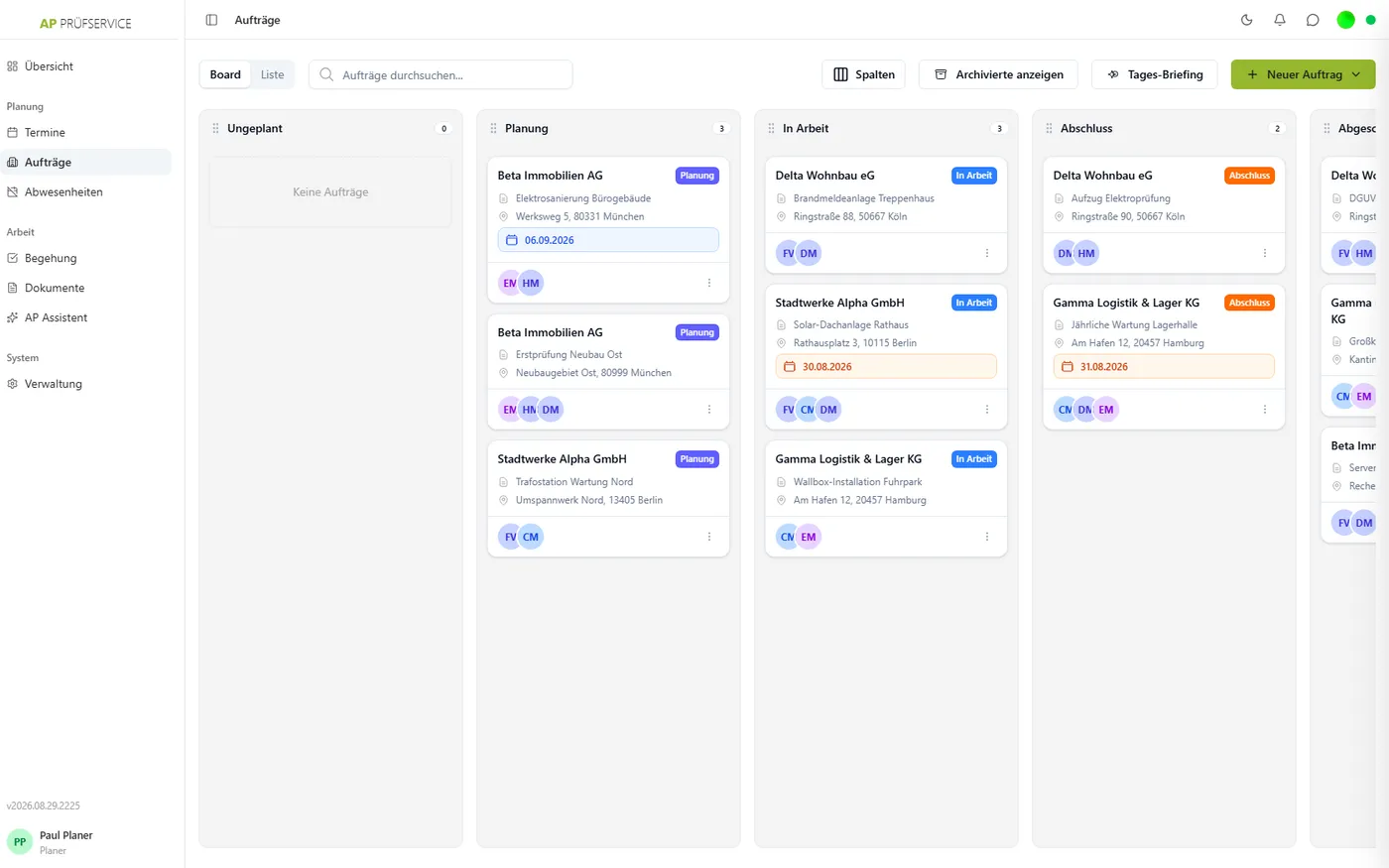
The board shows the order, date, team and status together, keeping the shared work queue understandable.
Shared work queue
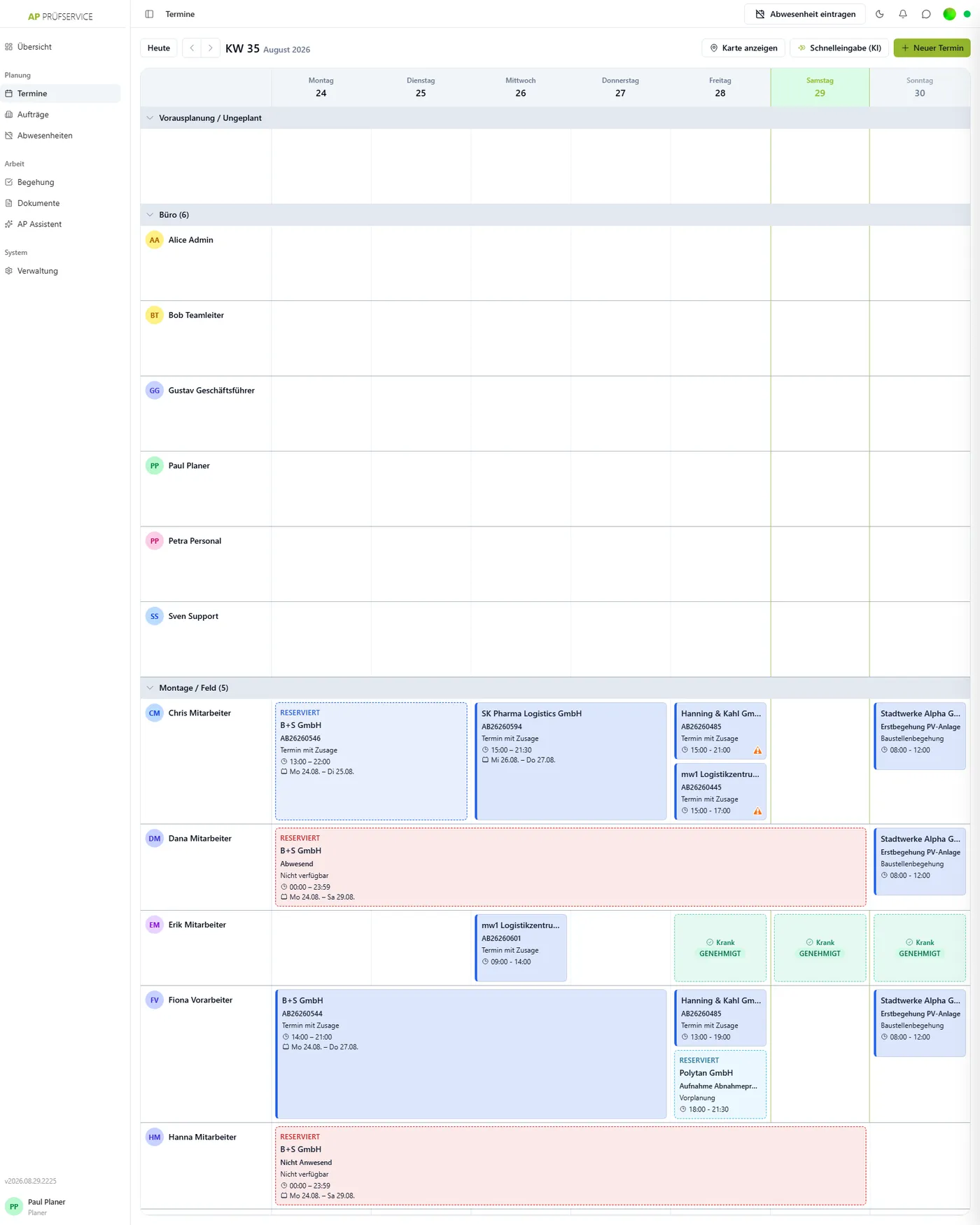
Enlarge viewThe weekly schedule connects appointments with teams and reservations. Office and field teams get a shared view of visits.
Shared weekly schedule
 Enlarge view
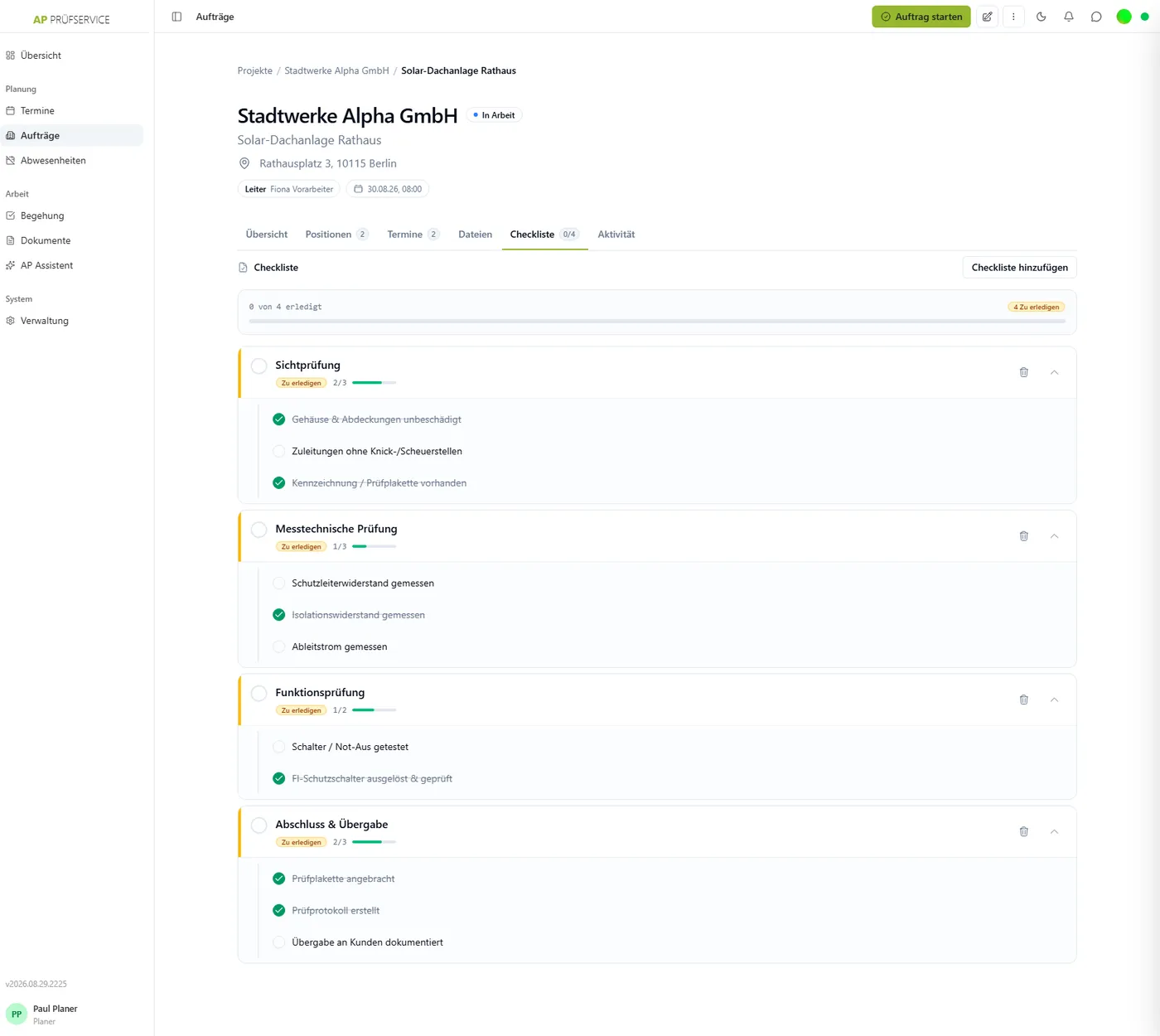
Checkpoints belong directly to the order. Open tasks and progress can be followed in their working context.
Check progress within the order
 Enlarge view
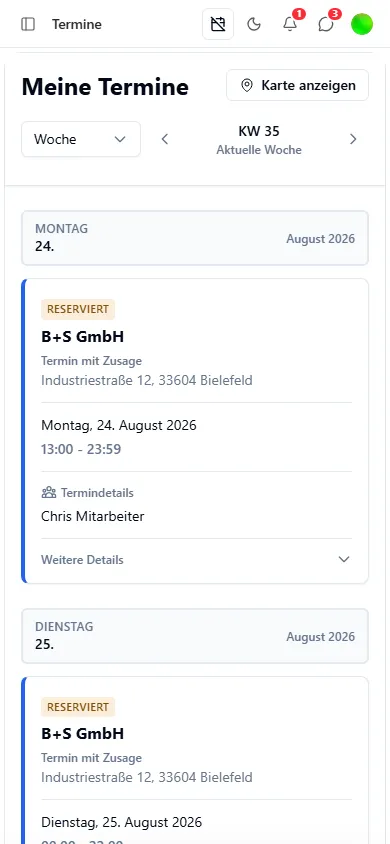
The field team opens assigned appointments in a mobile view. Time, site address and reservation are attached to each visit.
Mobile work context
 Enlarge view
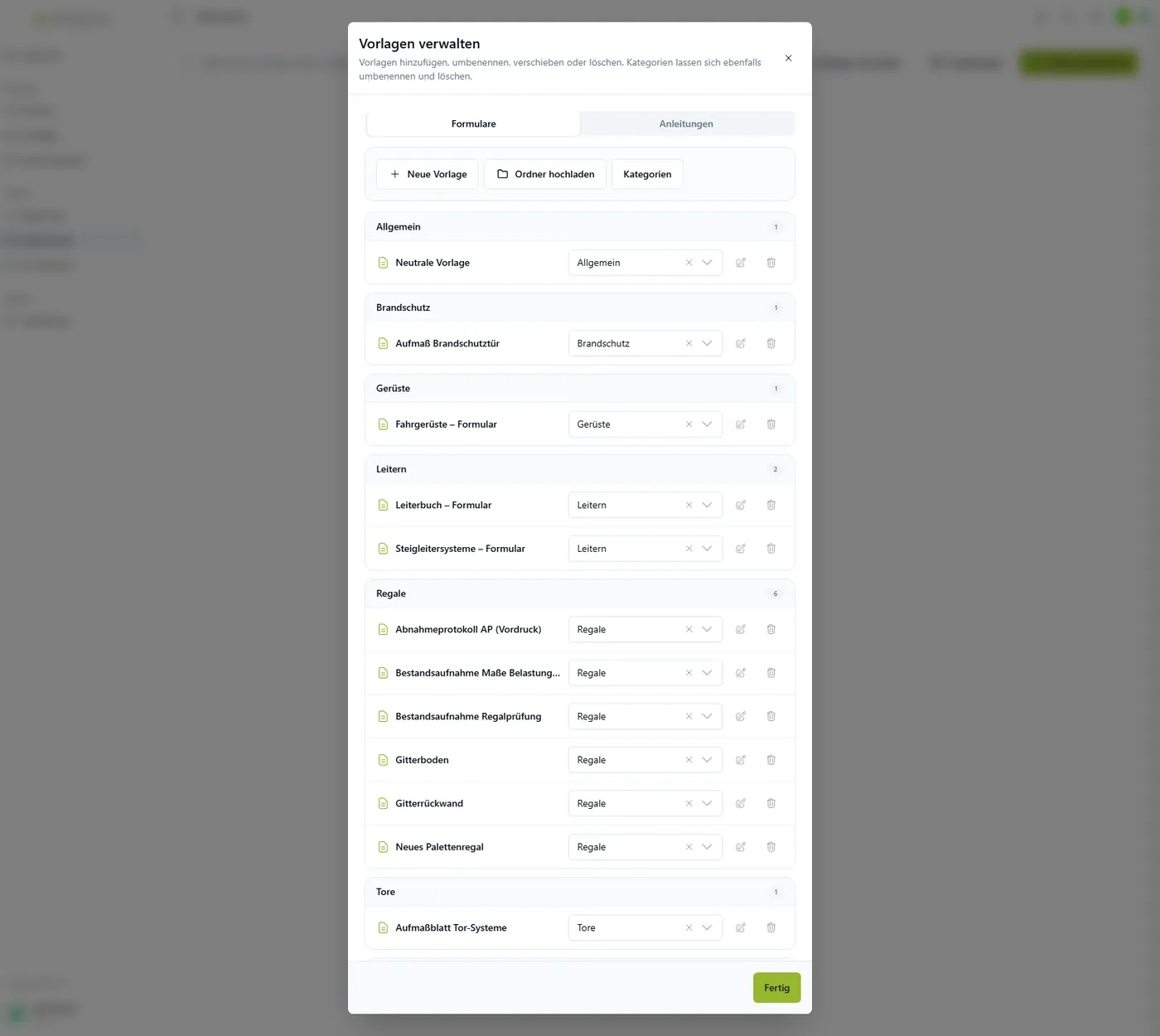
The template catalogue is organised by trade. Relevant forms can be assigned to the task and maintained in their category.
Appropriate forms for the task
 Enlarge view
For scheduling teams, office staff, order leads and mobile inspection teams.
T-NEX inspection service software connects an order with appointments, line items, files, checklists and completion. Office staff schedule the visit and the field team continues in the same record. Board and list views show orders awaiting scheduling, in progress or being completed.
An order can involve several visits and several buildings belonging to a customer. Photos, notes and the activity history stay with the record. Scheduling and technical teams can resolve questions against the same information.
| Work area | Task | Required view |
|---|---|---|
| Office and scheduling | Coordinate orders and visits | Weekly plan, status, teams and upcoming visits |
| Mobile inspection team | Record and document on site | Order, inspection points, files and work contributions |
| Order lead | Consolidate work and complete the order | Ticket status, time, combined report and approval |
The weekly grid assigns appointments to employees and teams. Reservations can be shown before an order is confirmed. Scheduling conflicts and absences are marked in the plan, while unassigned appointments remain in advance planning.
Recurring appointment series support repeat visits. Individual dates can be cancelled without removing the entire series. Multi-day visits can have different participants on each day. Customer, building and order addresses are brought together for scheduling.
Checklists are copied from the configured catalogue into an order. Progress is visible for each section and for the order as a whole. A section marked not applicable requires a reason, distinguishing it from work that is still outstanding.
A site survey can also be recorded independently of an order. Authorised administrators can adapt the capture form using a form editor. The initial customer visit can therefore be documented in a structured way before a specific inspection order is scheduled.
The mobile application stores data locally on the device and synchronises when connectivity returns. This supports locations with unreliable mobile reception or Wi-Fi. The actual workflow is configured for the selected devices and forms.
Introduction also includes the transition between online and offline operation. The team checks what information must be available before a visit and how pending changes are transferred reliably. Mobile operation and synchronisation form part of acceptance testing.
A work session connects time recording with a report sheet. Several visits produce several tickets, which can be completed individually or for the team. Completion combines contributions by day and employee with work performed, line items and a customer signature.
The documented completion workflow requires the order lead to check two conditions: all tickets have been submitted or explicitly skipped, and no working time remains unaccounted for. Completion can then be approved and the customer email triggered. Technical inspection decisions remain with the named professionals.
Configured PDF or Word templates can support inspection records, measurement sheets and acceptance documents. The documentation includes templates for fire protection equipment, shelving, gates, ladders and scaffolding. Catalogues and roles are adapted to your business processes.
The JTL-Wawi connection imports jobs via FTP and XML. Once a job is in progress, a rule protects it from being overwritten by later imports. Writing data back or adding other interfaces requires a separately agreed scope.
| Item | Scope |
|---|---|
| Source and direction | Jobs from JTL-Wawi into the inspection platform via FTP/XML. This import does not include writing data back. |
| Trigger | Automatically every 15 minutes; also available on demand in administration. |
| Mapping and protection | Employee import IDs provide assignment. From In Progress, status protection prevents later imports from overwriting the order. |
| Your contribution | Provide the JTL export and transfer access, check import IDs and field mapping, and reconcile a complete sample order. |
| Configuration | Access, data fields and the required scope are agreed for your business. |
Introduction begins with customers and buildings, teams, permissions, catalogues and templates. An order is then taken through intake, scheduling, mobile capture and approved completion. This tests the actual handovers between office and field staff.
Configured AI support can be added for questions about the data, capacity previews or import preparation. The core order management, scheduling and documentation workflow remains usable without an activated AI connection.
For businesses coordinating recurring visits, several employees, mobile documentation and an approved completion report. The documented templates cover several trades; your own inspection and approval process is configured during introduction.
The application organises the operational workflow. The responsible professional organisation defines the applicable inspection rules, intervals, qualifications and technical assessments. Templates do not constitute a blanket compliance certificate.
Yes. Site surveys have their own workspace with a customer, visit date, notes and configurable forms. They can take place before order scheduling.
Yes. Reporting distinguishes individual work sessions and team contributions. The order lead brings them together during completion and checks progress before approval.
The JTL-Wawi connection imports orders into the inspection platform while retaining the ERP system. The scope and data direction of additional connections are agreed against the available interfaces.
No. Order management, appointments and data capture form the core. AI functions require a configured connection and are added within the agreed scope.
T-NEX developed a job platform for AP Prüfservice, connecting office planning with mobile recording and the work performed on site.
View referenceDocument processing as a custom project: define required fields, test extraction against examples and connect the next step in your workflow.
Explore serviceT-NEX develops business applications and extends existing systems, from clickable prototypes and integrations to agreed handover and support.
Explore serviceBring a concrete task. Together, we will define what the application needs to do.
Discuss a product demo