A5Hub · project portfolio management
A5Hub as a T-NEX project reference: portfolios, project planning, resources and approvals in one application. Explore the workflows behind the project.
View reference
T-NEX PPM brings together portfolios, work packages, resources and costs. You can prioritise initiatives and align planning with the capacity actually available. AI helps draft plans that your team can refine further.
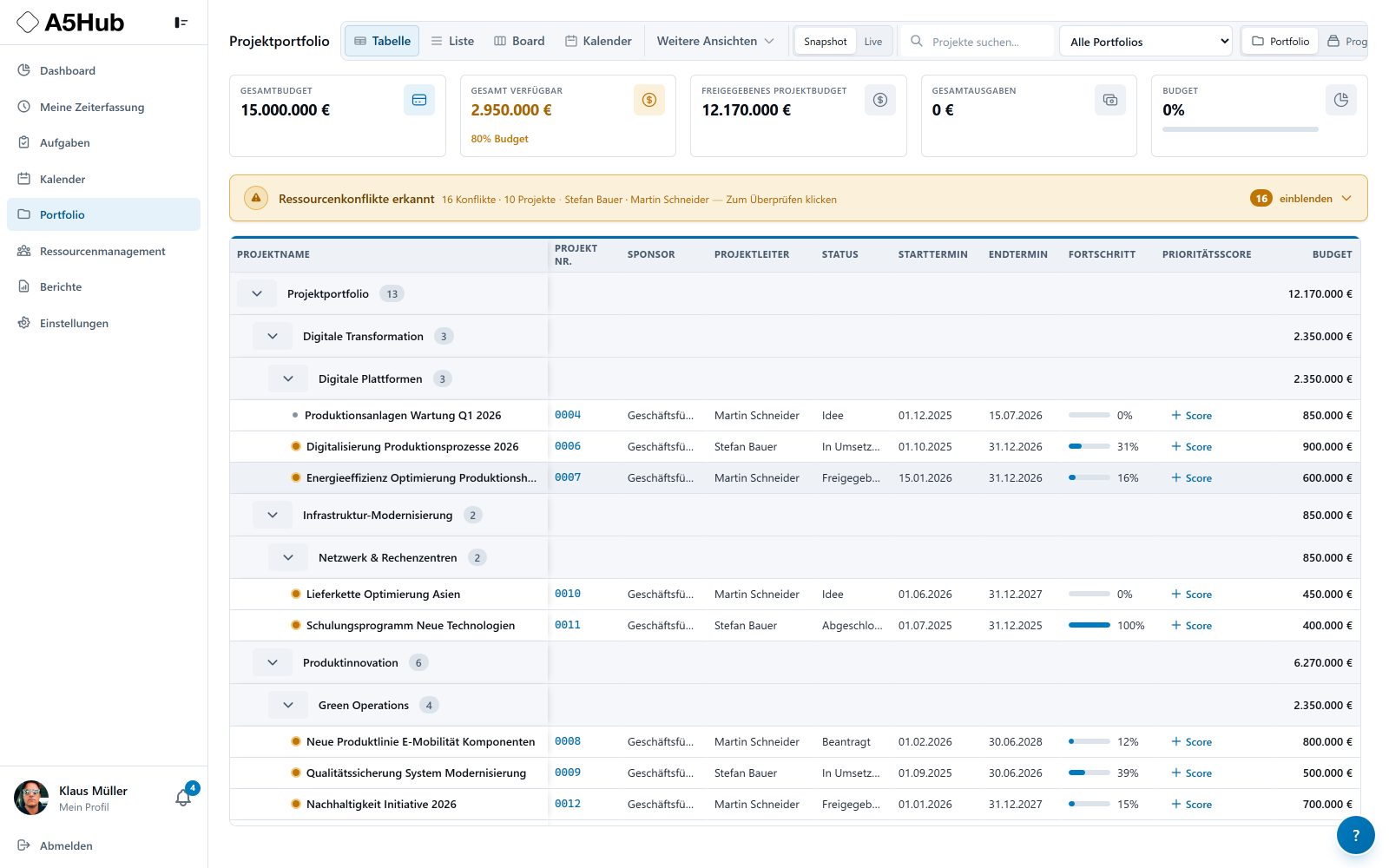
Portfolio, resources and milestone forecasts at a glance. Views from A5Hub illustrate the planning workflow.
The portfolio view connects projects, budgets and status. Resource conflicts appear in the context of the affected projects.
Shared view of projects, budget and resource conflicts
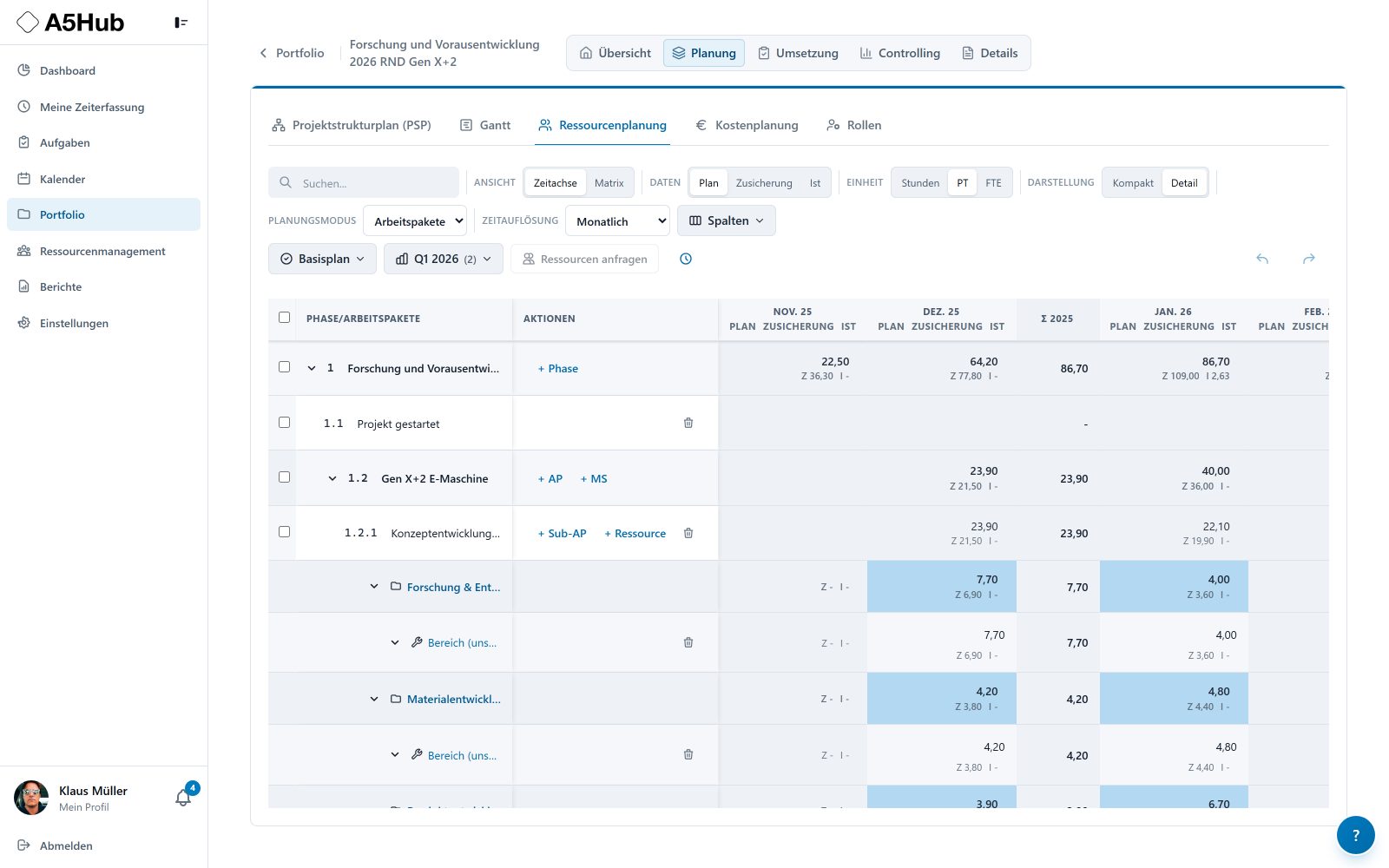
Enlarge viewPlan, commitments and actuals are shown separately for each work package. Project demand and line-management commitments can be compared directly.
Plan, line-management commitment and actuals shown separately
 Enlarge view
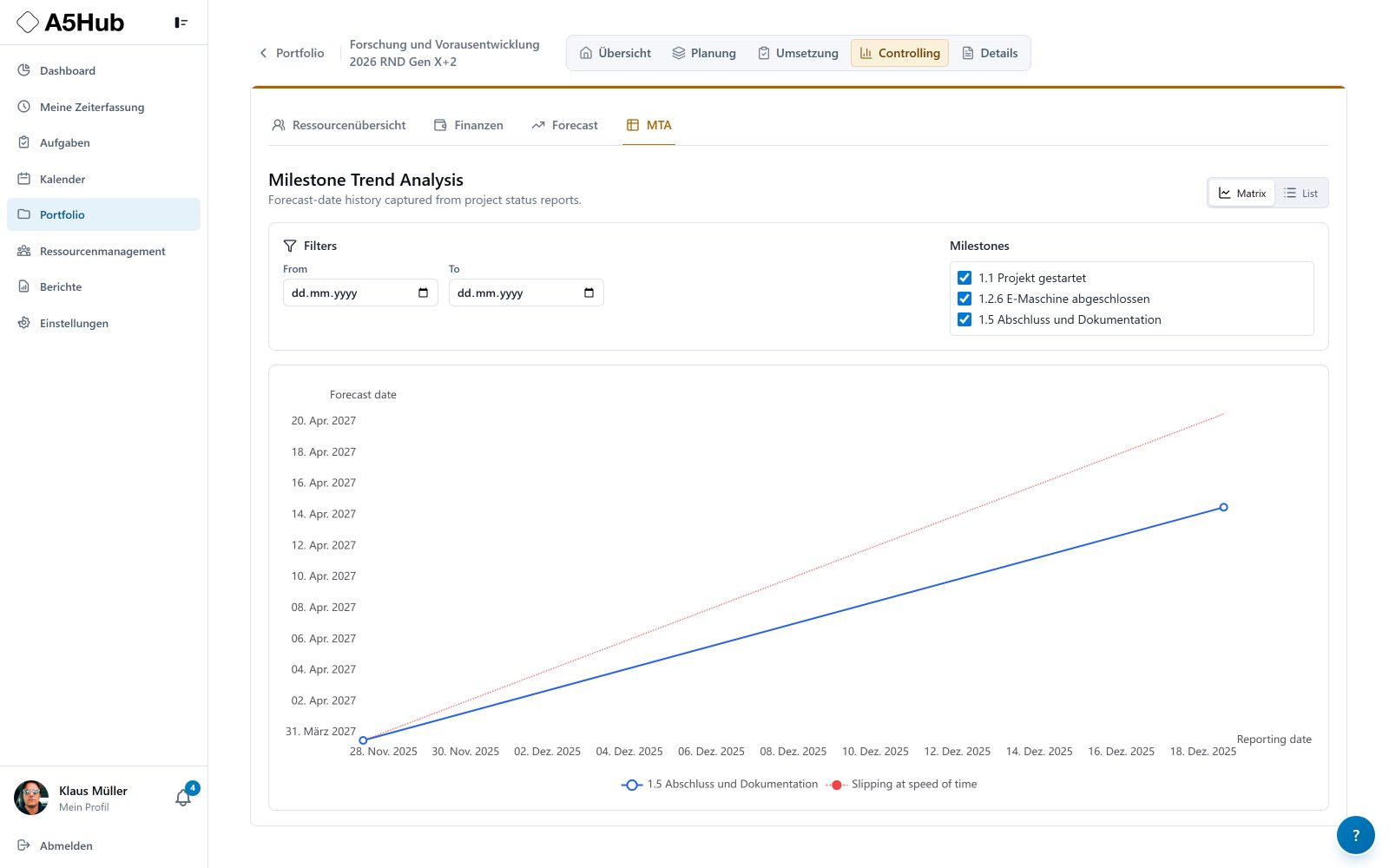
Milestone-trend analysis shows how forecast dates change across reports. It uses exported status reports, not automatic AI date predictions.
Milestone forecast history as a chart or list
 Enlarge view
For management, PMOs, project managers and resource owners in project-driven companies.
T-NEX PPM connects decisions about proposed work with delivery through projects. The portfolio organises projects against shared criteria and makes dates, costs, resources and risks comparable. Project teams continue within the same structure, down to individual work packages and tasks.
This is particularly useful when development projects, customer work and internal improvements compete for the same specialists. Management needs a shared overview, while project managers need to see the assumptions and commitments behind their plans.
Programme functions are disabled by default and are not yet fully developed. If your project requires programme management, we assess and agree that scope separately.
The work breakdown structure divides an initiative into phases and work packages. The Gantt view adds dates, dependencies and milestones. Resource and non-labour cost planning follow the selected planning level so that scope, time and effort remain connected.
The RACI matrix records who performs each work package, who is accountable and who needs to be consulted or informed. Task lists, Kanban views and calendars support daily work within the project context. Responsibilities remain visible when several departments contribute.
In T-NEX PPM, a resource request describes the capacity and skills a project needs over a given period. The responsible organisational unit reviews the request. Approval of a capacity allowance and a commitment naming specific people are separate steps. The named commitment is what binds individual capacity.
Routine departmental work, available capacity and open project requests feed into the utilisation view. The skills matrix adds competencies and their validity. Teams can discuss the actual constraint: insufficient time, missing skills or a project still waiting for a decision.
| State | Meaning |
|---|---|
| Demand | The project needs particular skills and capacity over a period. |
| Approved | The department approves a capacity allowance. |
| Committed | The commitment names individuals and binds their capacity. |
A saved baseline preserves the agreed plan. The Baseline vs Forecast report shows the baseline, current forecast and variance by project and organisational unit. The view can use hours, person-days or full-time equivalents.
Labour costs are derived from resource planning, while non-labour costs are planned separately. Time entries allocate completed work to a project and work package or to a departmental activity. Cost review therefore connects planned effort with the work actually recorded.
Risks, actions, stakeholders and change requests belong in project governance. Information stays with the relevant project and can be linked to tasks and responsible people. A change request describes a proposed change before it replaces the agreed plan.
Status reports bring together completed work, next steps, variances and decisions required. Export preserves the report as a snapshot. The saved state provides a shared basis for the next review. Combining reports at programme level is part of the programme functionality that requires separate assessment.
The AI work breakdown assistant drafts a structure from a description or proposes changes to an existing plan. A preview distinguishes new, changed and removed items. You can edit names, effort and duration and select individual suggestions.
Nothing is written to the project plan until you explicitly accept the selected changes. The function requires a configured AI backend and can be disabled by an administrator. The responsible team retains control of planning and approval.
Introduction starts with organisational units, roles, skills, cost categories and planning rules. A real project is then set up with a work breakdown structure, resource request and baseline. The team checks the complete workflow from planning to status reporting.
Project lists, permissions and data imports are aligned with your planning process. Views from the A5Hub project illustrate the workflows. We define the T-NEX PPM scope for your project.
The brief brings together scope, roles, integration questions and a suggested acceptance workflow. Use it to prepare the scope of your project.
A project to introduce a service portal needs business analysis and development capacity. This example shows how the project manager and line managers coordinate shared resources.
Project manager
The project manager records internal demand by work package, organisational unit, skill and period.
Review: Does the demand match the scope? Have the planning level and unit been agreed?
Result: A draft resource plan.
Project manager
A preview shows which organisational unit receives each part of the demand. The resource request is then submitted.
Review: Check recipients and periods before submitting.
Result: The demand row changes to Requested.
Line manager
The line manager checks demand and available capacity, then approves an allowance. A rejection includes a reason.
Review: Include other projects and operational work in the capacity decision.
Result: An approved allowance without a named assignment yet.
Line manager
The line manager identifies the people who will cover the approved demand during the planned period.
Review: Check skills, availability and competing commitments.
Result: The demand row changes to Committed and specific capacity is assigned.
Project manager
The resource plan shows the original demand alongside the actual commitment.
Review: Identify outstanding demand and coordinate further with the line manager where needed.
Result: An agreed plan with any remaining gaps visible.
Project manager and team
As work progresses, the team records actual time. Planned demand, committed capacity and actuals remain separate values.
Review: Review variances before changing dates or requesting further capacity.
Result: A traceable basis for project and capacity management.
The project can distinguish the capacity it requested, the allowance that was approved and the people who were actually committed.
An approved allowance is not a named commitment. External team members do not follow this internal approval process. This illustration explains the documented workflow; it is not an original product screenshot.
Programme functions are disabled by default and are not yet fully developed. If your project requires programme management, we assess and agree that scope separately.
Project portfolio management adds cross-project selection and steering to task management. T-NEX PPM connects project plans with capacity, costs, risks and reporting. A task list alone does not establish which initiatives can be delivered together by the available teams.
Yes. Project requests and departmental activities are combined in capacity planning. The responsible unit reviews demand and distinguishes approved allowances from commitments naming individual people.
The role model covers administrators, portfolio managers, programme managers, project managers, department managers, employees and external users. Permissions and assignment to projects or organisational units further control access. A programme role alone does not enable programme functionality; its usable scope is demonstrated and agreed separately.
No. The AI work breakdown assistant creates proposals with a preview and individual selection. Changes are saved only after explicit acceptance. This does not promise autonomous prioritisation or staff allocation.
The baseline is the fixed comparison point. Without it, a current plan can be viewed but its variance from the originally agreed plan cannot be assessed in the same way. Saving a baseline is therefore part of the introduction workflow.
A5Hub as a T-NEX project reference: portfolios, project planning, resources and approvals in one application. Explore the workflows behind the project.
View referenceT-NEX develops business applications and extends existing systems, from clickable prototypes and integrations to agreed handover and support.
Explore servicePPM for financial institutions: connect projects, line capacity, resource approvals and baselines, with traceable changes and AI proposals for work breakdown structures.
Learn moreBring a concrete task. Together, we will define what the application needs to do.
Discuss a product demo